Create a Planner Task from a Teams Post
Problem to solve
- Creating tasks in Planner every time a task arises - Working manually to create tasks - Wanting to create tasks directly from Teams interactions Solving the problem where the tasks of creating tasks increase.
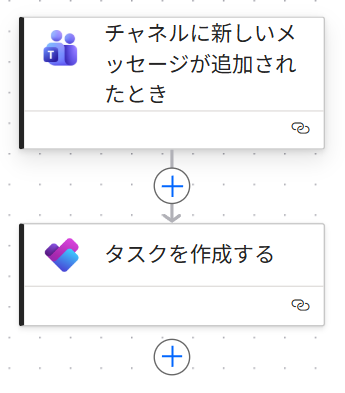
Completion Image
Ingredients
 Teams Connector
 Planner Connector
How to make
Triggered by a post in Teams, create a task in Planner. *This recipe is useful when combined with Notify Teams post when a Planner task is completed.
- 1. Set the trigger "When a new channel message is added"
Set any desired [Team] and [Channel].
Since this recipe does not filter by keyword, it is recommended to prepare a channel dedicated to task creation.

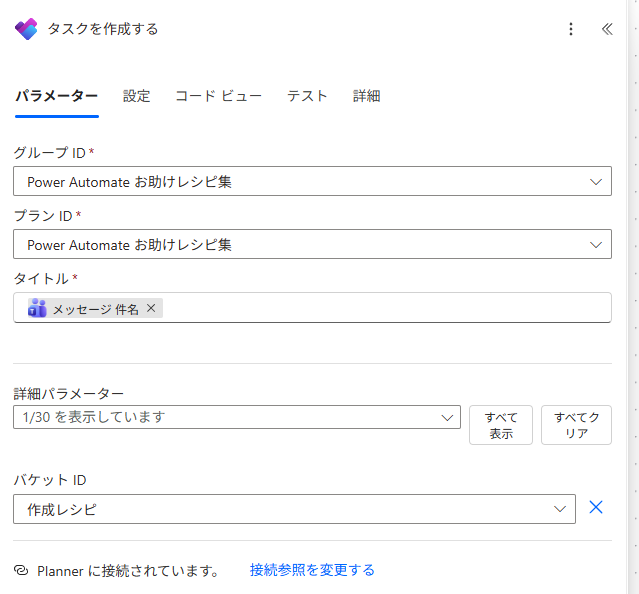
- 2. Set up the action "Create a task"
For [Group ID] and [Plan ID], set the destination for creating the Planner task.
Set [Title] to the "Message subject".
From the advanced parameters, select [Bucket ID] and choose the appropriate bucket.
*If you do not select a bucket ID, it will be created as "No bucket".
- 3. Operation Check
Make a post in Teams as shown in the figure below.
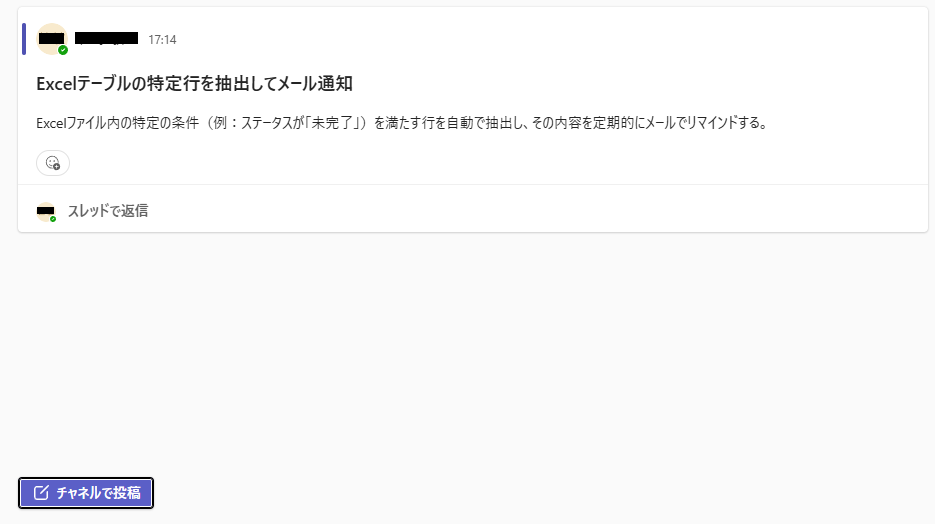
The subject of the Teams post becomes the Planner task.
*Please note that you cannot use the content of the post as the task's notes.
Related Recipes
Related Sites
Power BI Recipe Book

A recipe site for learning practical ways to use Power BI.
We introduce recipes by purpose and function. Create beautiful charts smoothly.
Getting Started with Power Apps

A recipe site for learning how to develop Power Apps from scratch.
No specialized knowledge is required, and we introduce practical recipes for daily work.