Notify Teams After an Item is Added to SharePoint
Problem to solve
Are you worried about such "oversights" in team shared document management? ・No one notices when new deliverables or materials are added to SharePoint ・Checking SharePoint repeatedly to see if there are any important updates ・Delay in contacting the person in charge even if information is added This recipe eliminates such oversights and smooths team collaboration. When a new item (deliverable, document, etc.) is added to a SharePoint list, Power Automate detects it and automatically notifies a specific channel in Teams. This allows the entire team to share new information in real-time, eliminating the hassle of checking and moving quickly to the next action.
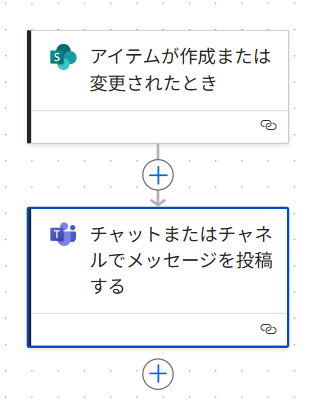
Completion Image
Ingredients
 SharePoint Connector
 Teams Connector
How to make
Use a SharePoint list to accept submissions of deliverables and documents.
Since a notification is sent to Teams after those items are added, there is no need to report via chat.
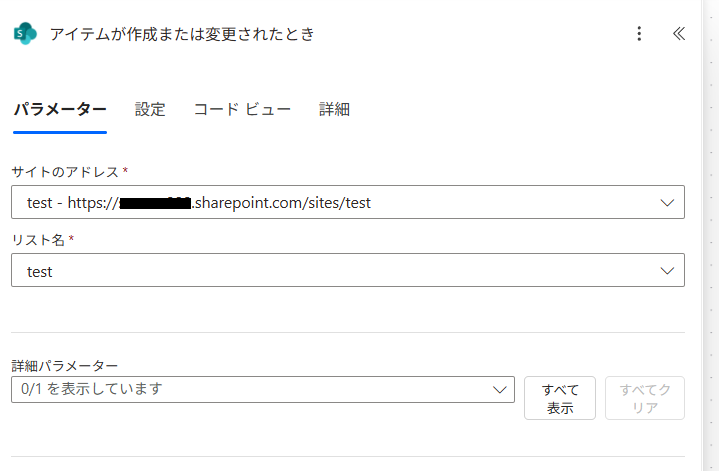
- 1. Set Trigger "When an item is created or modified"
Specify [Site Address] and [List Name].
* Note that it is not a document
In the case of a document, the trigger becomes "When a file is created or modified (properties only)", and you set [Library Name]
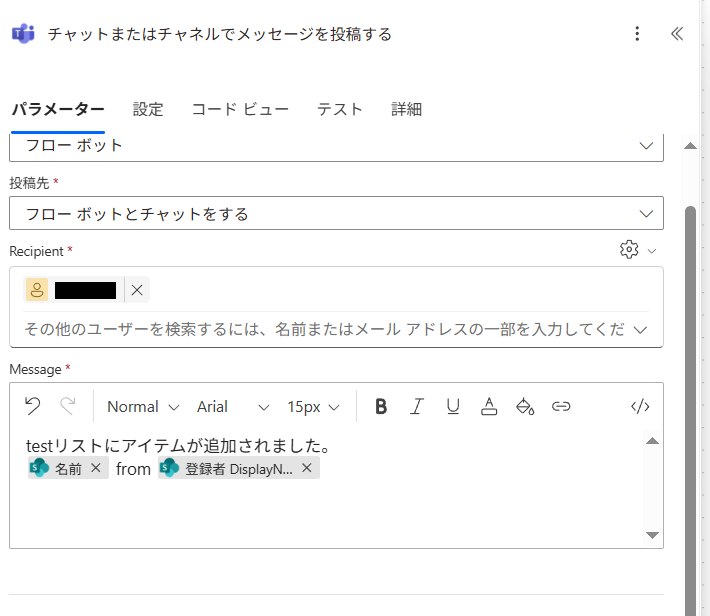
- 2. Set Action "Post message in a chat or channel"
Set arbitrary [Post as] and [Post in].
In [Message], add "Created By DisplayName" or "Name" (file name of the item).
Display who added what so that you don't get lost even if you see the Teams notification.
Related Recipes
Save Forms Responses as PDF (The Wrong Way)
When a response is sent to Forms, automatically save the content as a PDF file to OneDrive.
2026-02-27
Automatically Transfer Forms Responses to Excel
Automatically reflect Forms responses in Excel without opening the file every time a response is received.
2026-02-27
Related Sites
Power BI Recipe Book

A recipe site for learning practical ways to use Power BI.
We introduce recipes by purpose and function. Create beautiful charts smoothly.
Getting Started with Power Apps

A recipe site for learning how to develop Power Apps from scratch.
No specialized knowledge is required, and we introduce practical recipes for daily work.